
.png)
Support bundles are one of the most valuable tools you have for understanding what's happening in a customer's environment. But today, working with them is mostly a manual process. Whether your team is reviewing them in the Vendor Portal or digging into them with sbctl tooling, someone still has to go get the bundle, pull up the context, and piece together what's going on. That works for individual triage, but it doesn't scale when you want to route bundles into your support tooling automatically or analyze trends across your entire customer base.
What if every support bundle your customer uploaded automatically showed up in your support tool with the customer context, analysis results, and the bundle file attached to the right ticket? What if you could pull every bundle from the past month into your AI tooling to surface recurring issues across your entire customer base?
That's what we've been building toward this past quarter. A set of improvements to how support bundles are enriched, delivered, and accessed programmatically, so you can build workflows that fit how your team actually operates. Whether that's real-time escalation into Zendesk or ServiceNow, batch analysis for product insights, or something we haven't thought of yet.
One of the things driving this work is a principle we keep coming back to: Replicated should be an easily integrable component within the systems your team already uses, not a destination you have to context-switch into. The support bundle improvements in this post are a good example of what that looks like in practice.
This post walks through what's new, how to use it, and includes real API examples you can start building with today.
What's changed
Four areas of improvement come together here: metadata enrichment at bundle collection time, programmatic upload via the SDK, a new event notification system that can trigger automation when bundles are uploaded and analyzed, and API improvements that make it easier to retrieve bundle data and files programmatically.
Metadata enrichment
Your application can now write structured metadata alongside the support bundle at collection time using the Replicated SDK API. Using the same POST/PATCH pattern you're familiar with from custom metrics, you can include things like severity, environment, error type, ticket ID, customer notes, or really any key-value pair that's useful for triage and routing.
The metadata can be written to the SDK API (where it's stored and automatically collected at bundle generation time) or passed directly as a flag on the [.inline]kubectl support-bundle[.inline] CLI command. Both online and air gap environments are supported. For air gap, the metadata is embedded directly in the bundle for offline transfer.
You can also give bundles a friendly name, either programmatically or in the Vendor Portal UI, which makes identification easier when you're looking at a list of bundles across customers.
Programmatic upload via the SDK
Your application can now upload support bundles directly to Replicated using the SDK API. Once a bundle has been generated and is available on the instance, the SDK gives you a programmatic path to upload it to Replicated with metadata attached, rather than relying on your end customer to upload it manually through Enterprise Portal or transfer the file to your team.
GitGuardian, a secrets detection and remediation platform, took this a step further. In their recent talk, they walk through how they built a one-click support bundle flow in their admin UI that generates the bundle from within the cluster using a dedicated pod, attaches metadata (including the Zendesk ticket ID), and uses the SDK to upload it to Replicated automatically. The generation-from-UI piece is something they built custom on their side using a reference implementation, but the upload and metadata enrichment is all the Replicated SDK.
For air gap environments where the instance can't reach the internet, the bundle can still be generated with metadata embedded and uploaded later through the your company branded Enterprise Portal.
Event notifications with webhook delivery
The new event notification system (currently in beta, no opt-in required) lets you set up targeted alerts for events across your customer and application lifecycle. There are more than 20 event types available, and the ones most relevant to support workflows are [.inline]support.bundle.uploaded[.inline] and [.inline]support.bundle.analyzed[.inline].
What makes this useful is the filtering. You're not just subscribing to "any bundle was uploaded." You can scope a notification down to a specific application, customer, channel, license type, or even specific custom license field values. So you could set up a subscription that only fires when a paid customer on your stable channel uploads a support bundle, and route that notification to the Slack channel your tier one support team watches.
Webhook delivery is what makes this event-driven. When a bundle is analyzed, the webhook payload includes the [.inline]bundle_id[.inline], customer name, app, channel, license type, and any metadata that was attached to the bundle. That's enough context to route and prioritize before you even call the API.
Worth noting: the notification system also covers proactive monitoring events like instance state duration and status flapping, with configurable thresholds and built-in cool-down periods. These can alert you when an instance is unstable or unhealthy before the customer even reaches out. That's the "before the bundle" part of the same support workflow. We won't go deep on those in this post, but they're worth exploring alongside the bundle-specific events. Learn more about event notifications here.
API improvements for programmatic access
We've also recently added a dedicated download endpoint and filtering capabilities to the existing support bundle API:
- [.inline]GET /v3/supportbundle/:bundleId/download[.inline] returns a 302 redirect to the bundle file directly. Pass [.inline]?redirect=false[.inline] to get the presigned URL as JSON instead. Previously, downloading a bundle programmatically meant parsing the [.inline]signedUri[.inline] field from the metadata response.
- [.inline]GET /v3/supportbundles[.inline] now supports [.inline]startDate[.inline] and [.inline]endDate[.inline] filters (RFC3339 format) and a [.inline]severity[.inline] filter ([.inline]error[.inline], [.inline]warn[.inline], [.inline]info[.inline], [.inline]debug[.inline]). The severity filter returns bundles with any analysis insight at or above the specified level.
- Every bundle in both list and single-bundle responses now includes a [.inline]downloadUri[.inline] field, giving you a stable download link without extra lookups.
The single bundle endpoint ([.inline]GET /v3/supportbundle/:bundleId[.inline]) already returns customer info, instance details, channel, and analysis insights. Combined with the new download endpoint and list filters, you have the full API surface to build export workflows. See the Support Bundle API reference for the complete set of available commands.
Structured support bundle views in the Vendor Portal
While the focus of this post is programmatic access, the triage experience in the Vendor Portal itself has improved too. You can now browse Kubernetes events, pod statuses, container logs, and resource inventory directly in the support bundle detail page without downloading and extracting the bundle. For a lot of initial triage, this is enough to quickly scan what's going on before deciding whether you need to dig deeper with a tool like sbctl. We've also improved the flow so that when you're viewing a specific instance and click to view its support bundles, the list is pre-filtered to that instance's context rather than showing bundles across all instances.
Not every team is ready to build API integrations on day one, and this gives the Vendor Portal path a much better starting point for hands-on troubleshooting.
Putting it together: two workflow enablement patterns
These capabilities are useful individually, but the real value is in how they compose into powerful workflows. Here are two patterns that represent how software vendors can derive even more value from Support Bundles.
Just-in-time escalation to your support tool
The scenario: a customer uploads a support bundle. You want your support engineers to see that bundle, its analysis, and all the relevant context in the tool they already work in, without opening the Vendor Portal.
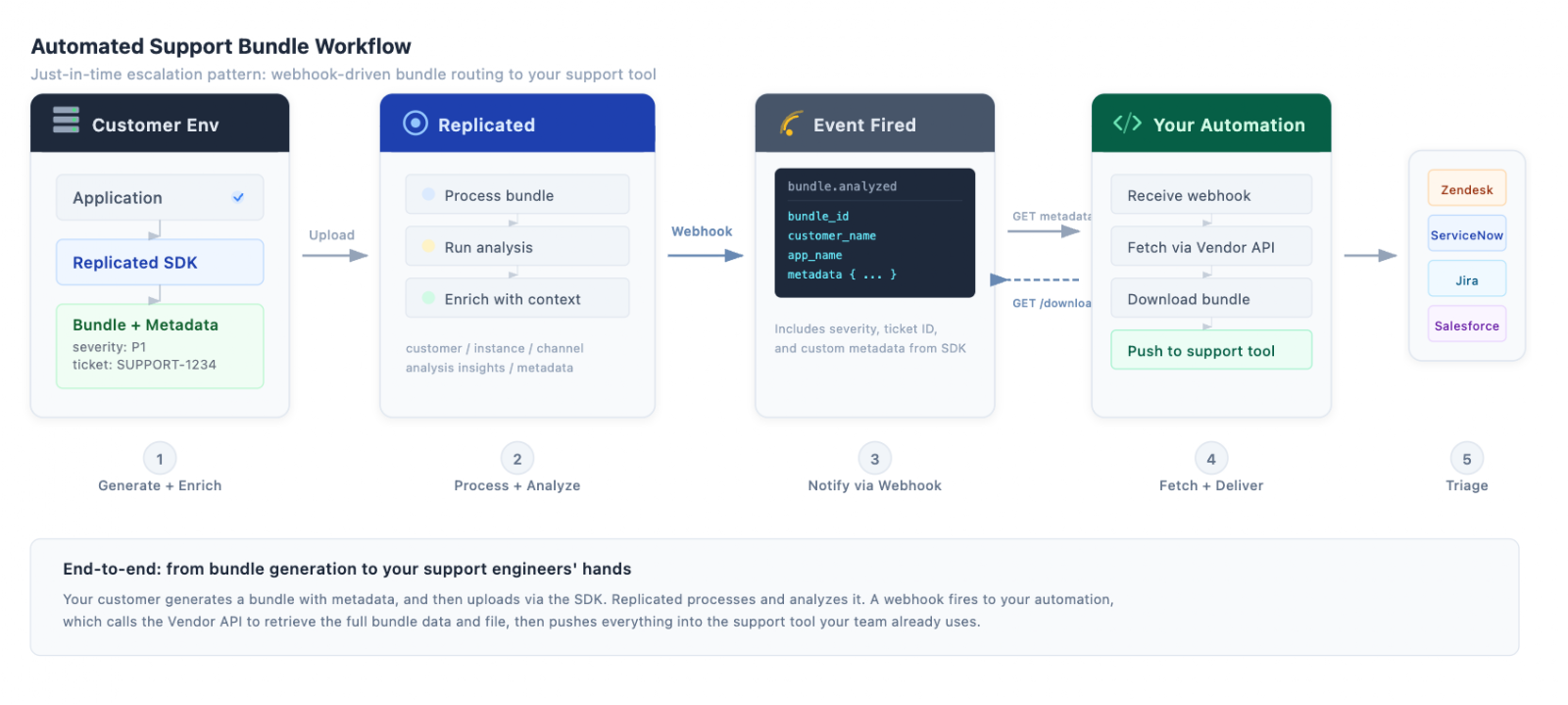
Here's how it works:
- Set up a notification subscription for the [.inline]support.bundle.analyzed[.inline] event with a webhook destination. Scope it to the customers, apps, or license types you care about.
- When analysis completes, Replicated sends a webhook to your endpoint. The payload includes the [.inline]bundle_id[.inline], customer name, app, channel, license type, and the metadata your application attached at collection time (e.g. ticket ID, severity, environment).
- Your automation extracts the [.inline]bundle_id[.inline] and fetches the full details:
[.inline]BUNDLE_ID="abc123" # from webhook payload[.inline]
[.inline]# Fetch full bundle metadata, customer info, instance, channel, and analysis[.inline][.inline]curl -H "Authorization: $REPLICATED_API_TOKEN" \[.inline]
[.inline]https://api.replicated.com/vendor/v3/supportbundle/$BUNDLE_ID[.inline]
[.inline]# Download the bundle file[.inline]
[.inline]curl -L -H "Authorization: $REPLICATED_API_TOKEN" \[.inline]
[.inline]https://api.replicated.com/vendor/v3/supportbundle/$BUNDLE_ID/download \[.inline]
[.inline]-o bundle.tar.gz[.inline]
- Push the metadata, analysis, and bundle file into your support tool. Your engineers get a fully contextualized ticket without leaving the tool they already work in.
If you include a ticket ID in the bundle metadata at collection time, your automation can also route the bundle data directly to the right ticket. No manual matching, no copy-pasting between systems.
Batch analysis for AI-driven insights
The scenario: you want to feed all support bundles from the past week into your AI tooling to identify recurring issues, spot trends across customers, and surface improvement opportunities your team might miss when triaging bundles one at a time.
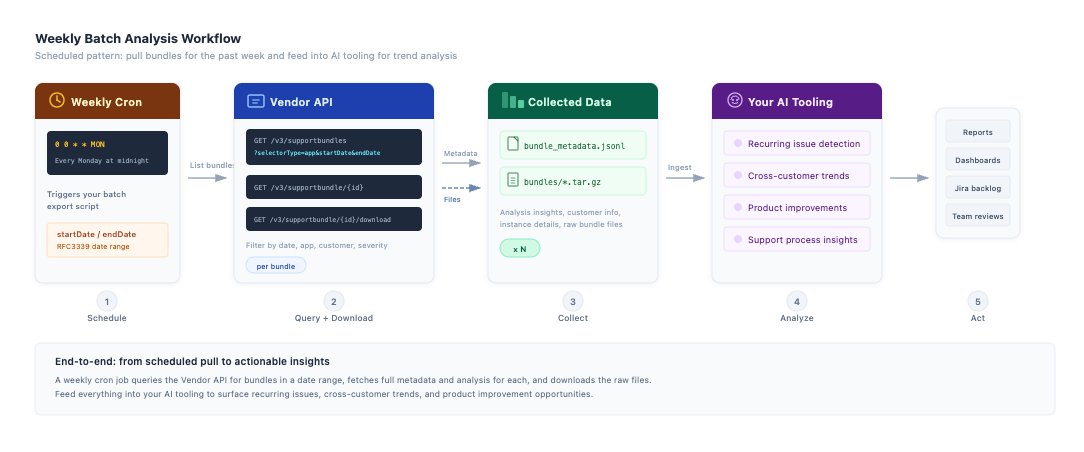
A weekly cron job can query the list endpoint with a date range, then fetch the full details for each bundle:
[.inline]# Calculate the date range for the past 7 days[.inline]
[.inline]START_DATE=$(date -u -v-7d '+%Y-%m-%dT00:00:00Z') # macOS[.inline]
[.inline]# START_DATE=$(date -u -d '7 days ago' '+%Y-%m-%dT00:00:00Z') # Linux[.inline]
[.inline]END_DATE=$(date -u '+%Y-%m-%dT23:59:59Z')[.inline]
[.inline]# List all bundles uploaded in the past week for your app[.inline]
[.inline]curl -s -H "Authorization: $REPLICATED_API_TOKEN" \[.inline]
[.inline]"https://api.replicated.com/vendor/v3/supportbundles?selectorType=app&selector=$APP_ID&startDate=$START_DATE&endDate=$END_DATE"[.inline]
That single call returns every bundle from the past week with analysis insights, customer info, and a [.inline]downloadUri[.inline] for each. For bundles where you need the raw files:
[.inline]# Iterate through each bundle to fetch full metadata and download the file[.inline]
[.inline]for BUNDLE_ID in $(curl -s -H "Authorization: $REPLICATED_API_TOKEN" \[.inline]
[.inline]"https://api.replicated.com/vendor/v3/supportbundles?selectorType=app&selector=$APP_ID&startDate=$START_DATE&endDate=$END_DATE" \[.inline]
[.inline]| jq -r '.bundles[].id'); do[.inline]
[.inline] # Fetch full metadata + analysis[.inline]
[.inline]curl -s -H "Authorization: $REPLICATED_API_TOKEN" \[.inline]
[.inline]"https://api.replicated.com/vendor/v3/supportbundle/$BUNDLE_ID" \[.inline]
[.inline]>> weekly_bundle_metadata.jsonl[.inline]
[.inline]# Download the bundle file[.inline]
[.inline]curl -sL -H "Authorization: $REPLICATED_API_TOKEN" \[.inline]
[.inline]"https://api.replicated.com/vendor/v3/supportbundle/$BUNDLE_ID/download" \[.inline]
[.inline]-o "bundles/${BUNDLE_ID}.tar.gz"[.inline]
[.inline] done[.inline]
From there, pipe [.inline]weekly_bundle_metadata.jsonl[.inline] and the extracted bundle contents into whatever tooling your team uses, whether that's an LLM pipeline, Jupyter notebooks, or a custom analytics system. The analysis insights give you structured severity data. The raw bundles give you logs, cluster state, and application output for deeper analysis.
You can also narrow the scope with [.inline]severity=error[.inline] to focus only on bundles that surfaced errors, or use [.inline]selectorType=customer&selector=$CUSTOMER_ID[.inline] to track a specific customer's trend over time.
For example, this API query gives you a month's worth of bundles for one customer with their analysis insights and download links, useful for tracking whether a customer's issues are recurring or resolving over time.
[.inline]# Pull all bundles for a specific customer over the last month[.inline][.inline]START_DATE=$(date -u -v-30d '+%Y-%m-%dT00:00:00Z') # macOS[.inline]
[.inline]# START_DATE=$(date -u -d '30 days ago' '+%Y-%m-%dT00:00:00Z') # Linux[.inline]
[.inline]END_DATE=$(date -u '+%Y-%m-%dT23:59:59Z')[.inline]
[.inline]# Download the bundle file[.inline]
[.inline]curl -sL -H "Authorization: $REPLICATED_API_TOKEN" \[.inline]
[.inline]"https://api.replicated.com/vendor/v3/supportbundles?selectorType=customer&selector=$CUSTOMER_ID&startDate=$START_DATE&endDate=$END_DATE" \[.inline]
[.inline]| jq '.bundles[] | {id: .id, name: .name, createdAt: .createdAt, downloadUri: .downloadUri, insights: [.insights[] | {level: .level, detail: .detail}]}'[.inline]
[.inline]done[.inline]
How GitGuardian is putting this to work
If you want to see what a mature version of this workflow looks like, the GitGuardian team gave a great talk walking through their implementation.
Their pipeline works like this: when a bundle is analyzed, the webhook notification fires to their internal AI tooling. The AI parses the bundle contents, identifies the root cause, generates a fix recommendation with a confidence score backed by evidence from the bundle logs, and comments directly on the correct Zendesk ticket (routed using the ticket ID from the bundle metadata). Their support engineers can resolve most cases without ever escalating to the level three team.
As Jérémy from their team put it: "bundle plus AI just works. AI is very good at parsing a lot of data. The combination really works brilliantly."
A few things worth noting from their approach:
- Metadata is the routing glue. The Zendesk ticket ID attached at generation time is what lets their automation comment on the right ticket without manual matching.
- They process bundles via webhook, not polling. The [.inline]support.bundle.analyzed[.inline] event gives them near-real-time processing.
- For air gap customers, they built a direct download option in the UI so the bundle can still be transferred and uploaded manually.
- They're also using the customizable collectors in the support bundle spec to include logs from their own log collection system alongside the standard Kubernetes data, which gives their AI more context to work with.
How to start your own support bundle workflow automated integration
If you want to start building these workflows, here's a practical path:
- Start with a notification subscription. Go to the Notifications page in the Vendor Portal, create a subscription for [.inline]support.bundle.analyzed[.inline], and point it at a webhook endpoint you can inspect (even a simple logging endpoint works to start). See what data comes through.
- Add metadata to your bundles. If you're using the Replicated SDK, start writing relevant context (severity, ticket ID, environment) at runtime. This is what turns the webhook payload from "a bundle was analyzed" into actionable routing information.
- Build your first API integration. Use the [.inline]GET /v3/supportbundle/:bundleId[.inline] endpoint to pull the full metadata for a specific bundle, and the download endpoint to retrieve the file. Once that works for one bundle, the batch pattern is just a loop.
The Support Bundle API reference has the full set of available commands. If any of this is relevant to what you're working on, reach out to your account team or connect with us directly in Slack. We'd love to hear how you're putting it to use.